Mainline
KAI Road of Kubernetes 02 — What a Deployment is, and why Pods should not be babysat manually
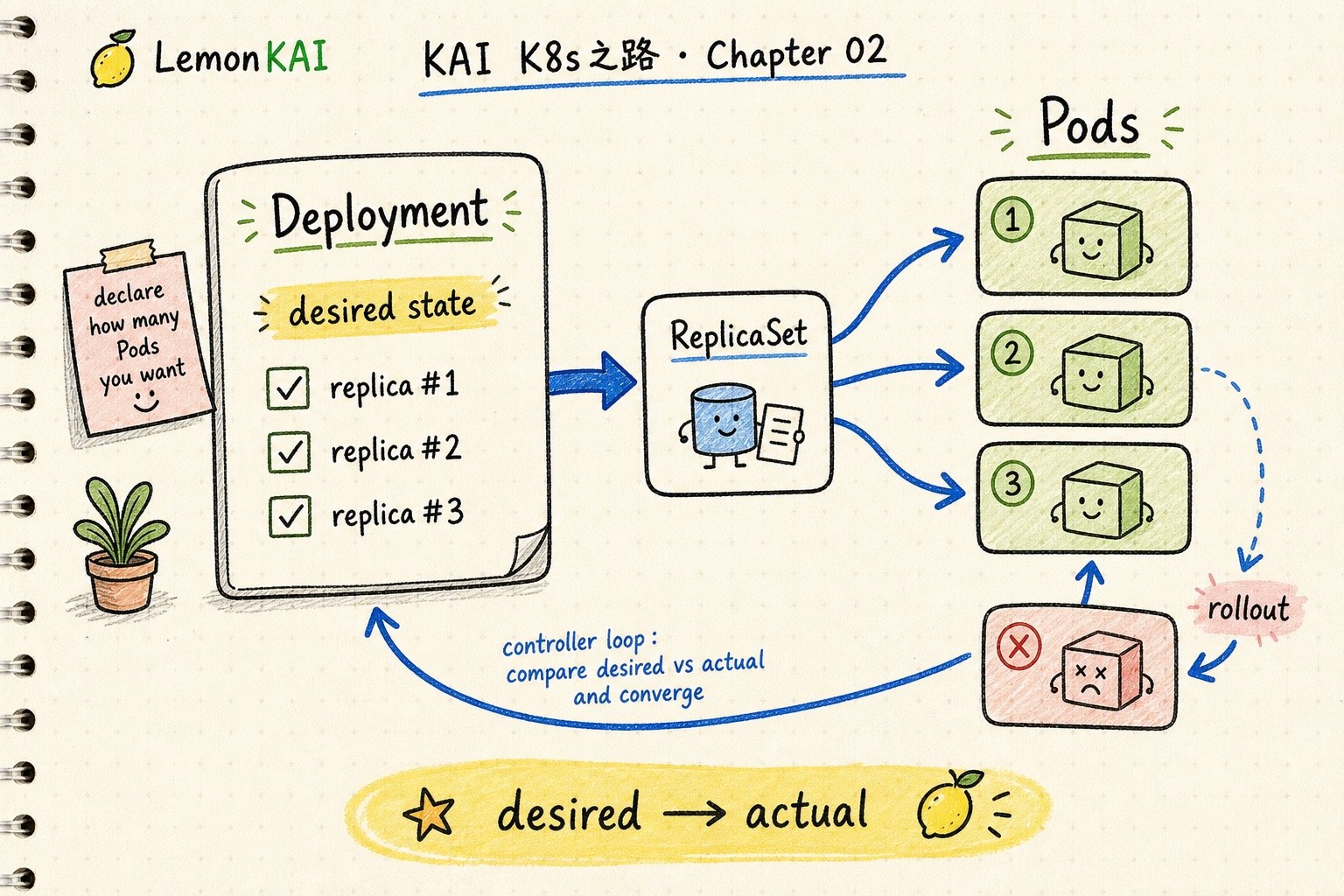
A Pod is not enough. A Deployment captures the desired replica count, Pod template, selector, and rollout behavior so Kubernetes can keep a workload converged.
A Pod is one landing of a workload. A Deployment is the rule that keeps the workload converged.
Do not babysit individual Pods. Start from the Deployment's replicas, selector, Pod template, rollout status, and events.
The previous chapter separated containers from Pods.
A container runs a process. A Pod is the first Kubernetes workload boundary.
But that immediately creates the next question:
If a Pod fails, moves to another node, or needs a new image version, are we supposed to babysit every Pod by hand?
No.
The sentence I would keep is this:
A Pod is one landing of a workload. A Deployment is the rule that keeps the workload converged.
Do not babysit Pods manually
A Pod matters, but an individual Pod is not something you should usually treat as a long-lived pet.
A Pod can be deleted, recreated, renamed, and rescheduled. It is closer to “this workload landed here this time.”
The thing you want to preserve is not the Pod name.
The thing you want to declare is:
- how many replicas should exist
- what each Pod should look like
- which Pods belong to this workload
- how fast a new version should replace the old one
- whether a bad release can be rolled back
That is where a Deployment enters.
Think of it as a shift schedule
I think of Pods like people currently working a shift.
A Deployment is closer to the shift schedule plus the manager.
A schedule does not say: “protect this exact person at the counter forever.”
It says:
Keep three people at the counter, using the current process. If someone leaves, bring in a replacement. If the process changes, do not replace everyone at once.
That is close to the Deployment mental model.
You are not preserving a specific Pod. You are describing the state a workload should keep returning to.
What a Deployment actually describes
A Deployment is one of the most common Kubernetes workload controllers, usually used for stateless, interchangeable application Pods.
Its core idea is declarative:
This is the state I want the workload to reach and maintain.
The first three fields I usually read are:
spec:
  replicas: 3
  selector:
    matchLabels:
      app: web
  template:
    metadata:
      labels:
        app: web
    spec:
      containers:
        - name: web
          image: example/web:v2
I read them like this:
replicas: how many Pods should be runningselector: which Pods belong to this workloadtemplate: what a new Pod should look like
Together, those fields form the desired state.
Deployment, ReplicaSet, and Pods
This is where beginners often look at the wrong layer.
A Deployment usually does not directly manage every Pod. It manages ReplicaSets, and ReplicaSets maintain the replica Pods.
A useful compression is:
Deployment -> ReplicaSet -> PodsThe Deployment owns the higher-level behavior: rollout, rollback, version changes, and scaling.
The ReplicaSet maintains the requested number of Pods.
The Pods are the runtime result.
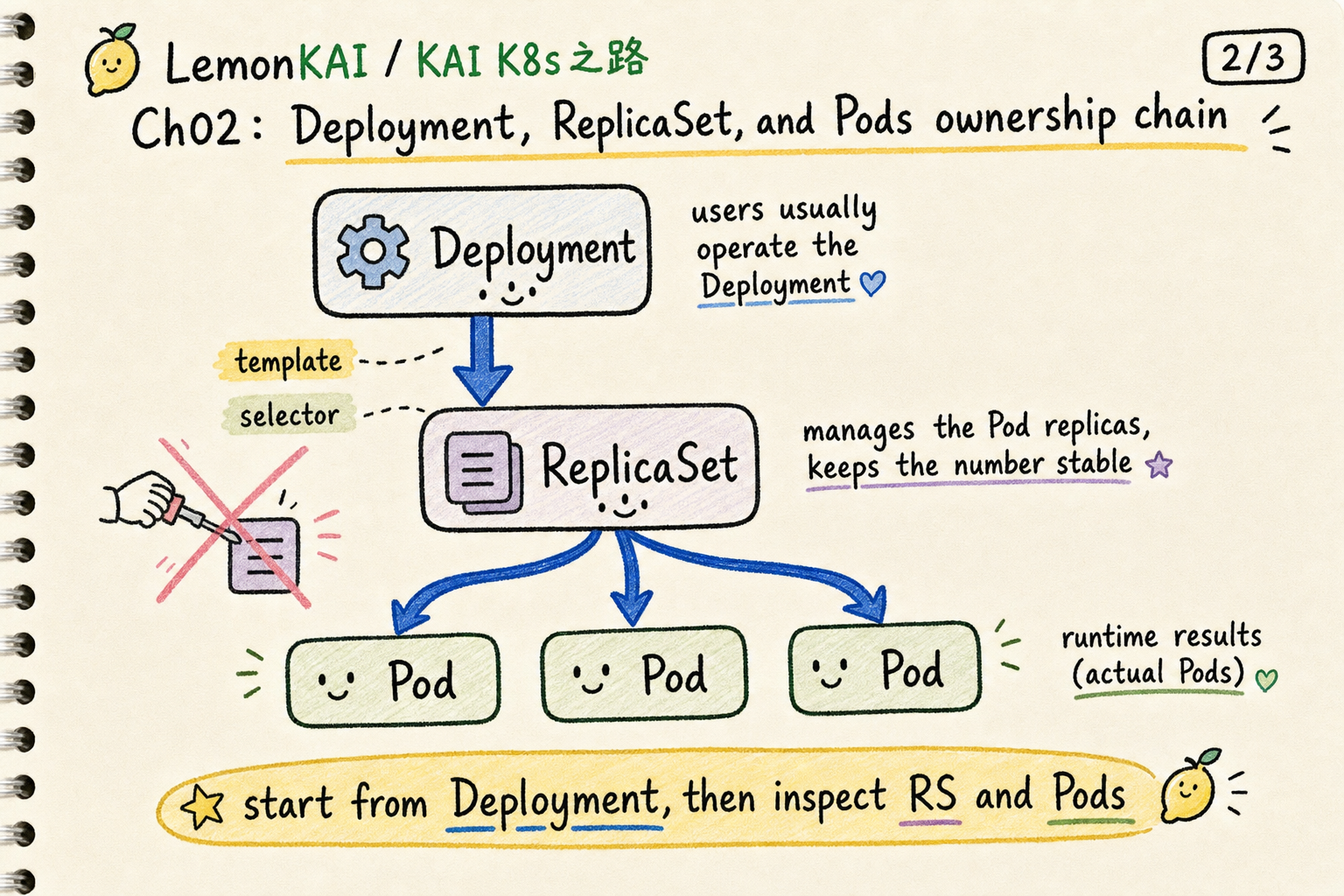
This is also why the Kubernetes documentation warns you not to directly manage ReplicaSets owned by a Deployment.
You can inspect them. You can debug through them. But they are usually not the main control surface.
The useful word is convergence
The most important Deployment idea is convergence.
The real world keeps drifting away from the desired state:
- a Pod fails
- a node has a problem
- an image changes
- replicas are missing
- a rollout gets stuck
- readiness never passes
The Deployment controller keeps comparing:
desired state vs actual stateThen it creates, deletes, or replaces Pods until the actual state moves toward what you declared.
That is very Kubernetes.
You are not issuing a one-time command. You are writing down the correct state and letting a controller keep chasing it.
A Deployment does not replace everything at once
Another major value is rollout control.
When you change the Deployment’s Pod template, such as moving the image from v1 to v2, the Deployment creates a new ReplicaSet and gradually scales it up while scaling the old ReplicaSet down.
One detail matters: a rollout is triggered by changes to the Pod template. Scaling the replica count is not the same thing.
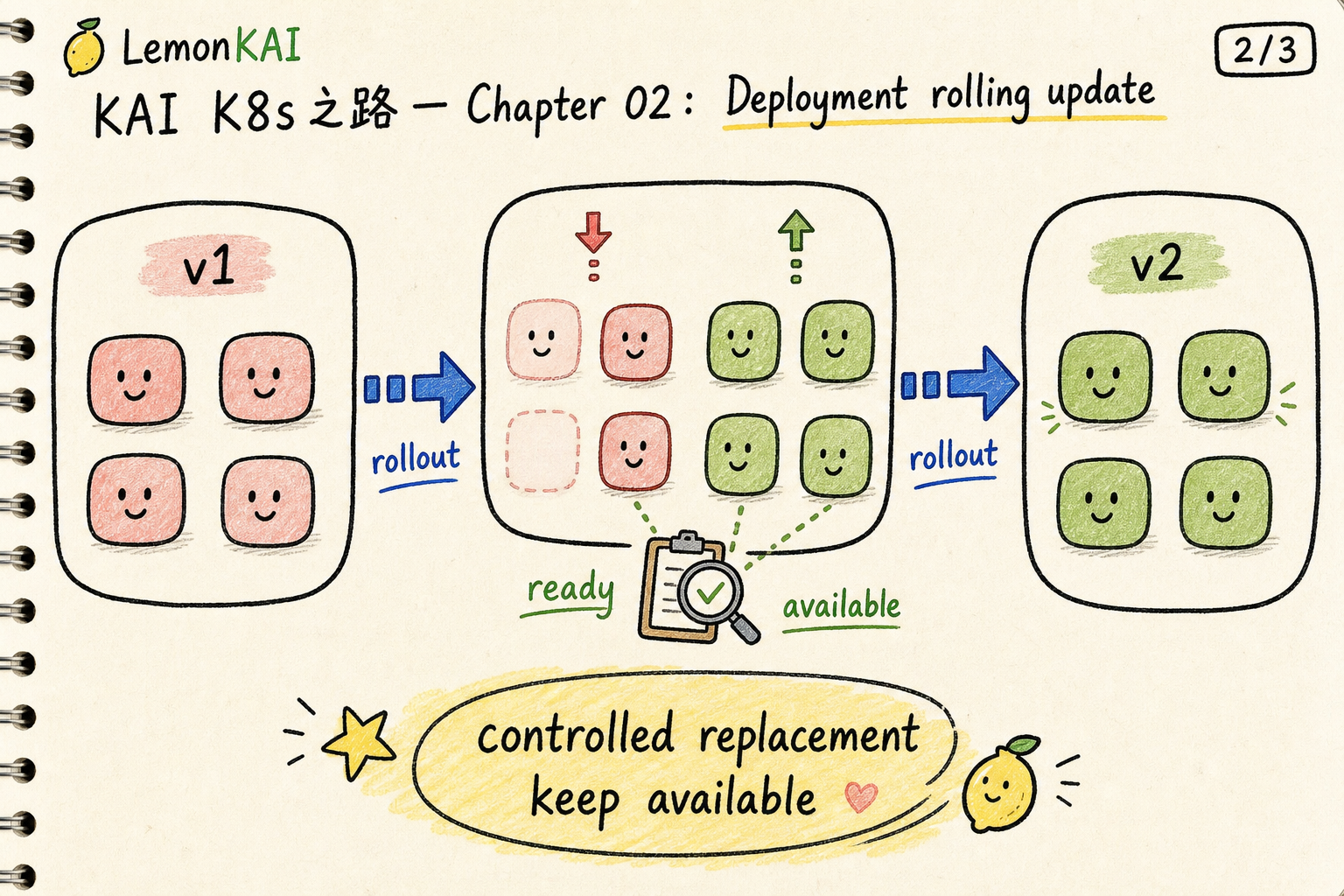
That is why production release checks should not stop at kubectl get pods.
You want to know whether the rollout completed, whether the new replicas are available, and whether the old ReplicaSet has scaled down as expected.
Common misunderstandings
1. Treating a Deployment like a bigger Pod
A Deployment is not a larger Pod.
It is a controller-facing object. You describe a desired state, and the controller uses ReplicaSets and Pods to converge toward it.
2. Deleting Pods as the first reflex
Deleting a Pod can be a valid debugging move, but if every fix starts with manually deleting Pods, you are working around the controller’s language.
The better question is:
Why does the Deployment keep producing Pods that return to the same bad state?
That points you toward the template, image, config, probes, resources, and events.
3. Assuming replicas mean healthy service
replicas: 3 is only the desired count.
You still need to read Ready, Available, and Updated status. Three Pods existing does not mean three Pods are ready to serve production traffic.
4. Ignoring selector risk
A Deployment uses its selector to decide which Pods belong to it.
If selectors and template labels are wrong or overlapping with another controller, the system can behave in surprising ways.
How I would inspect a Deployment
For an unfamiliar workload, I usually start here:
kubectl get deploy -n <ns>
kubectl describe deploy <deploy-name> -n <ns>
kubectl rollout status deployment/<deploy-name> -n <ns>
kubectl get rs -n <ns>
kubectl get pods -n <ns> --show-labels
For release-related debugging:
kubectl rollout history deployment/<deploy-name> -n <ns>
kubectl rollout undo deployment/<deploy-name> -n <ns>
I pay attention to:
- whether
READYis close to desired replicas - whether
UP-TO-DATEmatches the new template - whether
AVAILABLEreflects real usable replicas - whether events show scheduling, image pull, or probe failures
- whether old and new ReplicaSets match the expected rollout state
That is closer to how Kubernetes actually operates than staring at one Pod log first.
Deployment is not the answer for every workload
This chapter focuses on Deployments because they are the common entry point for stateless applications.
But not every workload belongs in a Deployment.
If a Pod needs stable identity or storage identity, you may need StatefulSet.
If every node needs one copy of an agent, you may need DaemonSet.
So I place Deployment here:
When Pods are interchangeable, a Deployment is the main controller that keeps their count, version, and rollout rhythm converged.
Three takeaways
- A Pod is the runtime landing. A Deployment is the desired state and convergence rule.
- A Deployment uses ReplicaSets to maintain Pods and handle rollout / rollback.
- When debugging app workloads, start from the Deployment’s selector, template, replicas, and rollout status before zooming into individual Pods.
Next in the series: Pods keep changing, so how does a Service give them a stable entry point?