Mainline
KAI Road of Kubernetes 03 — What a Service is, and why Pod IPs should not be your interface
Pods can be replaced by Deployments at any time. A Service gives a changing group of Pods a stable network entry point through DNS, ClusterIP, selectors, EndpointSlices, and ready backend endpoints.
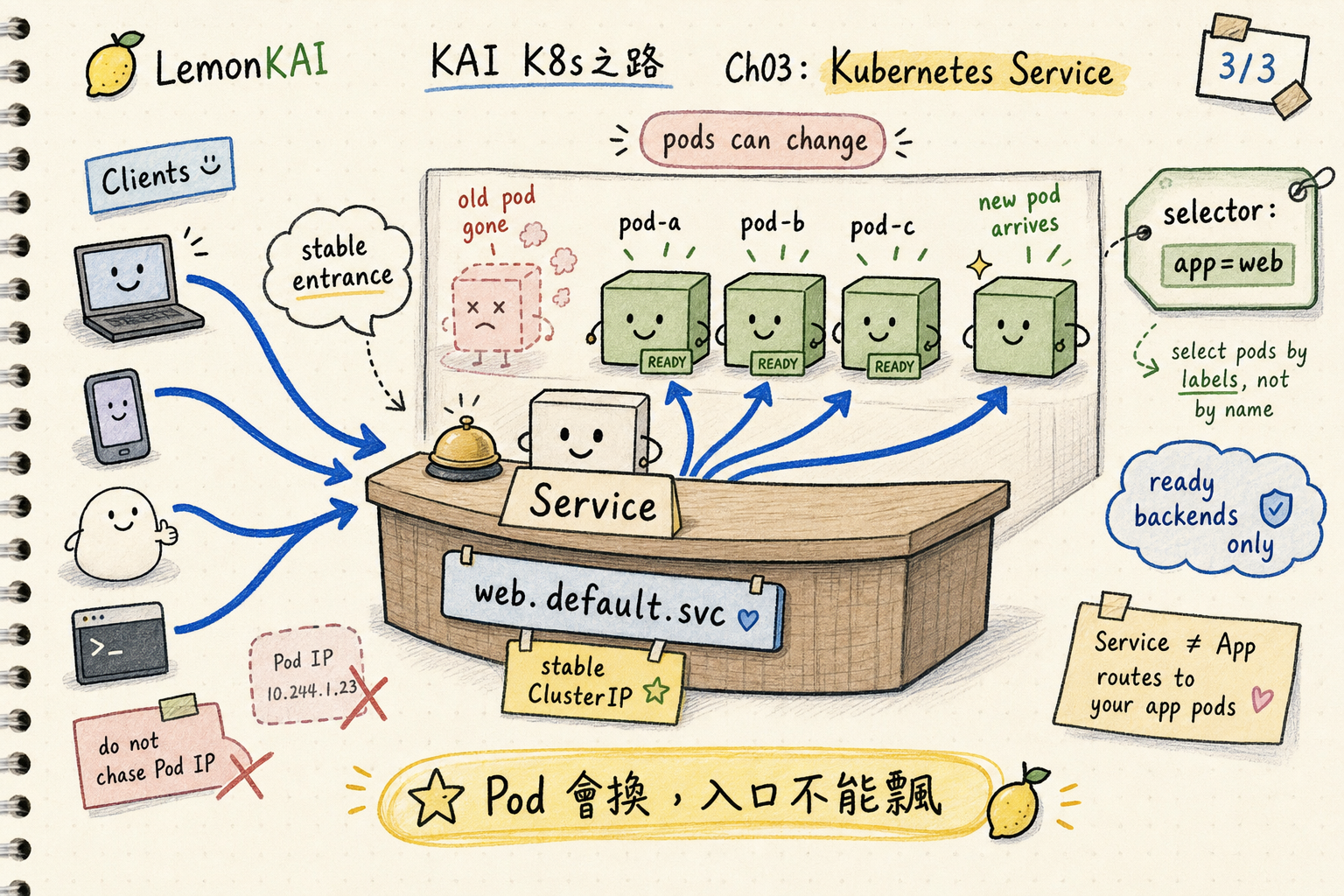
Pods change and Pod IPs drift. A Service turns a group of Pods into a stable network entry point.
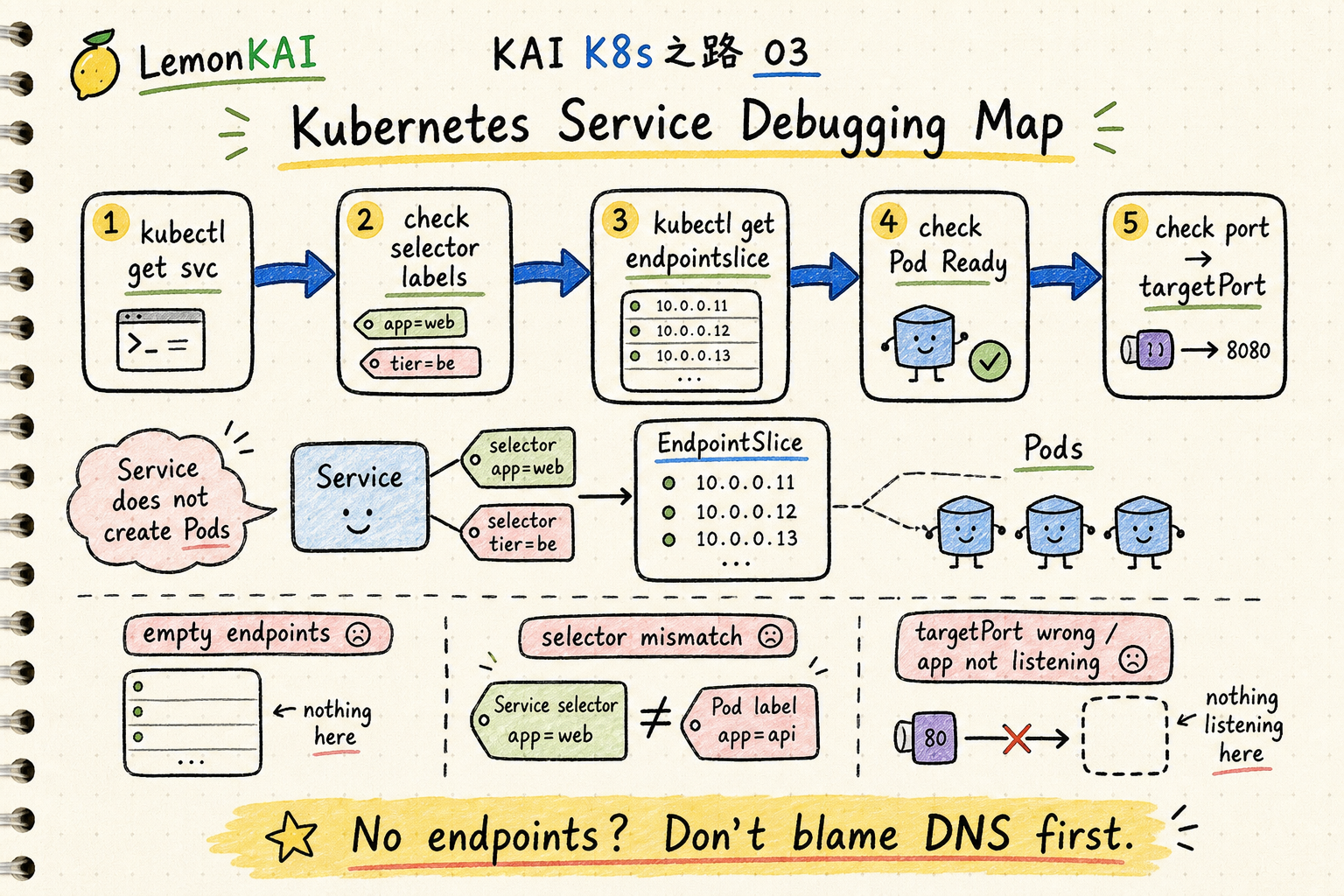
When debugging a Service, do not stop at the ClusterIP. Follow selector, EndpointSlice, Pod readiness, and targetPort.
The previous chapter introduced Deployment as the reason we do not babysit Pods manually.
A Pod can fail and be recreated. A rollout can replace old Pods with new ones. A node problem can move the workload somewhere else.
That is normal.
But it immediately creates the next problem:
If Pods keep changing, how does anything connect to them?
I would not let a frontend remember a backend Pod IP. That is like asking customers to chase whichever worker happens to be on shift today.
The sentence I would keep is this:
Pods change and Pod IPs drift. A Service turns a group of Pods into a stable network entry point.
Do not chase Pod IPs
A Pod has its own IP address. That matters.
But a Pod IP is not a durable interface.
A Deployment might have three Pods now and three different Pods after the next rollout. Names change. IPs change. Nodes can change.
If another workload connects directly to a Pod IP, it is binding itself to one temporary landing of the workload.
Kubernetes wants a different mental model.
You put a changing group of Pods behind a stable entry point, so the caller only needs to know:
I want the web service.not:
I want Pod 10.244.2.17.That is where Service enters.
Think of Service as a fixed counter
Continue the shift-schedule example from the Deployment chapter.
A Deployment is like the schedule plus the manager: keep three people at the counter, replace someone who leaves, and roll out a new process gradually.
What is a Service?
I think of it as the fixed counter number.
Customers do not need to know which three people are working behind the counter today. They do not need to know where one worker moved.
They only need to know:
Go to counter 3.
That is what a Service does.
It is not the worker. It is not the shift schedule. It is the stable entry point in front of a set of matching, currently usable backend Pods.
This analogy also prevents one common mistake:
If there is nobody behind the counter, the counter number still exists, but the service will not magically work.
A Service can have an entry point and still have no healthy backends.
What a Service actually describes
A common Service looks like this:
apiVersion: v1
kind: Service
metadata:
  name: web
spec:
  type: ClusterIP
  selector:
    app: web
  ports:
    - name: http
      port: 80
      targetPort: 8080
I read it like this:
metadata.name: web: the stable entry point is namedwebtype: ClusterIP: by default, expose a stable internal cluster IPselector: app=web: which Pods count as backends for this Serviceport: 80: the port clients use on the ServicetargetPort: 8080: the port the application listens on inside the Pod
The easy-to-miss part is the selector.
A Service does not find Pods by Deployment name. It does not find Pods by Pod name.
It usually finds backends by label selector.
So if the Deployment’s Pod template uses:
labels:
  app: api
but the Service says:
selector:
  app: web
then the Service may have no backends.
The entry point exists, but the room behind the door is empty.
How Service, DNS, and EndpointSlice fit together
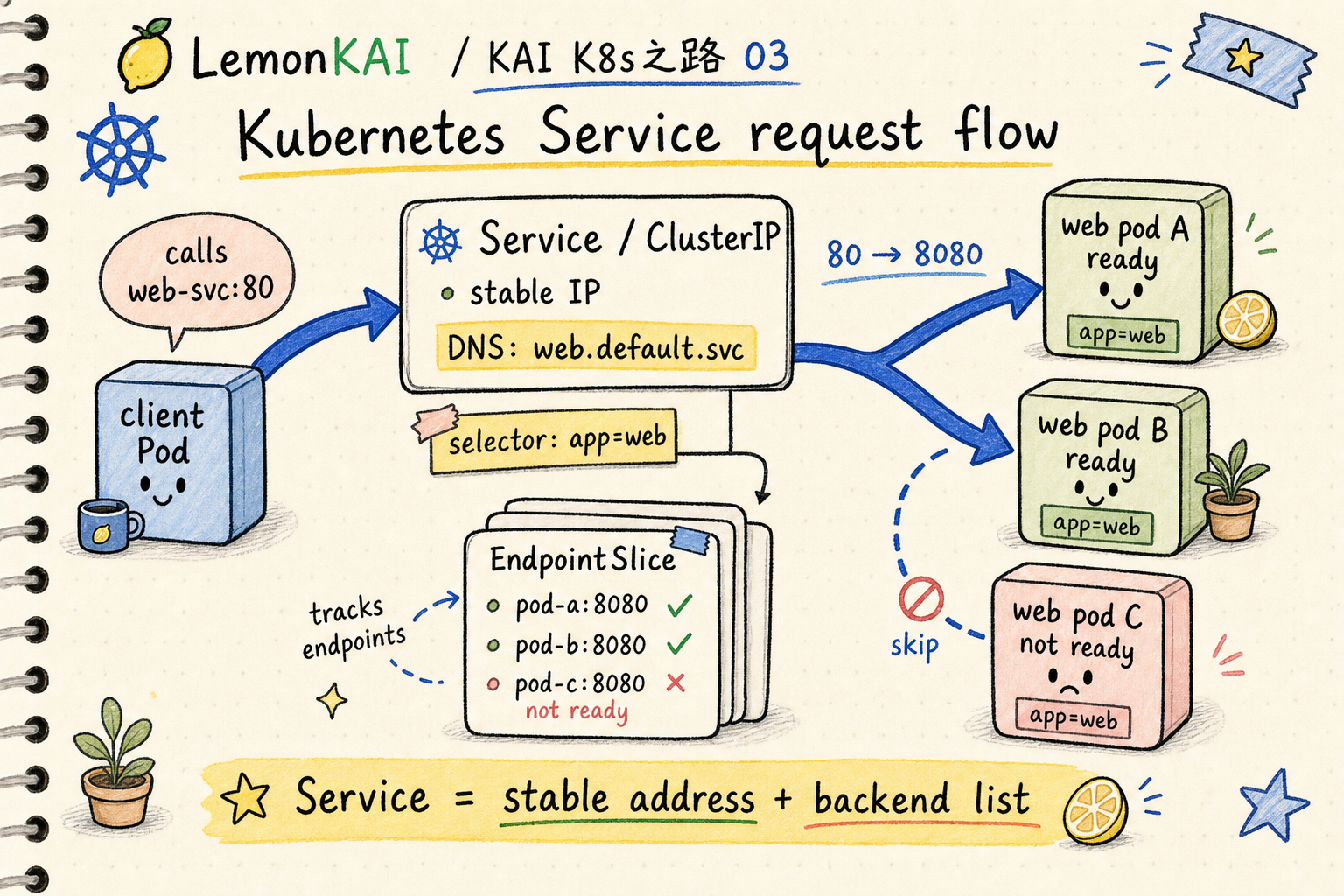
A normal ClusterIP Service gets a cluster-internal IP address and a DNS name.
Within the same namespace, you can often use the short name:
webAcross namespaces, you can be explicit:
web.default.svc.cluster.localBut DNS only helps the client find the Service entry point.
The current backend list is not hidden inside DNS. Kubernetes maintains it through EndpointSlices based on the Service selector.
A useful path is:
client -> Service DNS / ClusterIP -> EndpointSlice -> ready Pod IP:targetPortA fuller version:
- You create a Service with a selector.
- Kubernetes finds Pods whose labels match the selector.
- EndpointSlices record the backend endpoints.
- The service proxy or dataplane on each node routes traffic using that endpoint information.
- Clients keep using the stable Service name or ClusterIP.
One detail matters: Service is not the health check itself.
Whether a Pod becomes a usable backend is usually tied to Pod readiness. A Pod can exist, but if readiness has not passed, traffic should not normally be sent to it.
So when debugging a Service, do not only ask:
Does the Service have an IP?
Ask:
Does the EndpointSlice have ready endpoints?
Do not mix up port and targetPort
This mistake is very common.
The Service port is what the client sees.
The targetPort is where the traffic is sent on the backend Pod.
For example:
ports:
  - name: http
    port: 80
    targetPort: 8080
means:
client -> web:80 -> Pod:8080If the application actually listens on 3000 but the Service says targetPort: 8080, the Service can exist and endpoints can exist, but requests still fail.
For production manifests, I usually prefer named ports where possible:
# Service
ports:
  - name: http
    port: 80
    targetPort: http

# Pod template
ports:
  - name: http
    containerPort: 8080
Then if the container port changes from 8080 to 3000 later, keeping the same semantic port name can reduce unnecessary Service changes.
Service types: know the boundary first
Beginners often think Service means “expose this to the internet.”
That is only partly true.
The default ClusterIP Service is an internal cluster entry point, not a public internet entry point.
A first-pass model:
ClusterIP: default, internal to the clusterNodePort: opens a port on every node from a configured range; usually not my first choice as a clean production entry pointLoadBalancer: asks a cloud provider or external implementation to provision an external load balancerExternalName: maps the Service name to an external DNS name using CNAME
There is also headless Service:
clusterIP: NoneIt does not give the usual ClusterIP. DNS returns backend endpoints instead. You often see this with StatefulSets or systems where clients need to know individual backend identities.
The main point for this chapter is simpler:
Service is not a synonym for “public exposure.” It is first a stable service-entry abstraction.
Common misunderstandings
1. Thinking a Service creates Pods
A Service does not create Pods.
Creating and maintaining Pods is the Deployment / ReplicaSet layer.
A Service watches labels, finds matching backends, and provides the entry point.
If there are no Pods, or if the selector does not match any Pods, the Service will not create backends for you.
2. Assuming a Service IP means the app works
A ClusterIP means the Service object exists.
For the request to work, you still need:
- a selector that matches Pods
- EndpointSlices with endpoints
- Pods that pass readiness
- a correct
targetPort - an application that actually responds
A Service is an entry point, not a magic guarantee.
3. Treating selectors casually
If the selector is too narrow, it selects no Pods.
If it is too broad, it may select Pods that should not receive this traffic.
This is painful because the YAML can be valid while traffic behavior is wrong.
I treat the Service selector as a contract:
Which Pods are allowed to stand behind this entry point?
4. Mixing Service, Ingress, and LoadBalancer together
Service first solves stable access to a group of Pods inside the cluster.
Ingress and Gateway more often solve how external HTTP / HTTPS traffic enters the cluster, including host/path routing, TLS, and richer traffic policy.
A LoadBalancer Service can give you an external entry point, but it is not a full replacement for Ingress or Gateway.
Separate the layers first. The rest becomes easier.
How I would inspect a Service
If someone says “this svc is not working,” I would not stop at kubectl get svc.
I follow this path:
kubectl get svc -n <ns>
kubectl describe svc <svc-name> -n <ns>

kubectl get endpointslice -n <ns> \
  -l kubernetes.io/service-name=<svc-name>

kubectl get pods -n <ns> --show-labels
kubectl get pods -n <ns> -l app=web -o wide
kubectl describe pod <pod-name> -n <ns>
I look for:
- what selector the Service uses
- whether Pod labels actually match
- whether EndpointSlices contain addresses
- whether endpoint conditions are ready / serving
- whether Service
portmaps to the correct backendtargetPort - whether the Pod readiness probe keeps failing
To test DNS and HTTP from inside the cluster, I might start a temporary client:
kubectl run tmp-curl -n <ns> --rm -it \
  --image=curlimages/curl -- sh

nslookup web
curl -v http://web:80
If DNS resolves but the EndpointSlice is empty, the problem is usually not DNS.
If EndpointSlices have ready endpoints but requests time out, then I continue toward targetPort, application listen address, NetworkPolicy, CNI, or dataplane issues.
My Service mental model
I do not like memorizing Service as “the Kubernetes load balancer.”
That sentence is too rough. It mixes ClusterIP, NodePort, LoadBalancer, and Ingress into one blurry idea.
I prefer this:
A Service is a stable entry point backed by a backend list that changes as Pods change.
That naturally leads to two debugging questions:
- Does the entry point exist?
- Is the backend list correct and usable?
Once those are separate, Service becomes much easier to reason about.
Three takeaways
- Pod IP is not the stable interface. A Service is the stable entry point a group of Pods exposes.
- A Service uses selectors to find Pods, and EndpointSlices track the current usable backend endpoints.
- Debug Service through
Service -> selector -> EndpointSlice -> Pod readiness -> targetPort; do not stare only at ClusterIP.
Next in the series: Service gives the cluster a stable entry point. How does Kubernetes know which Pods are actually ready to receive traffic?