Mainline
KAI Road of Kubernetes 05 — ConfigMaps and Secrets: keep settings out of the image
Probes let a workload report state, but the same application still needs different settings in different environments. This chapter separates container images, ConfigMaps, and Secrets so runtime configuration does not get baked into the image.
An image should package the program, not the environment decision. ConfigMaps and Secrets let Kubernetes inject runtime data into Pods without rebuilding the image.
Use ConfigMaps for non-sensitive settings and Secrets for sensitive data. Inject them as env vars or files, remember env values do not live-update, and treat Secrets as an access-controlled delivery mechanism rather than a complete vault.
The previous chapter separated Running from Ready.
A workload has to report its state clearly, so Kubernetes knows when to send traffic and when a restart is justified.
But a workload needs more than state.
The same program usually needs different settings in dev, staging, and production. It may need different endpoints, feature flags, and credentials.
If every configuration change requires a new image build, the image is no longer just the program. It has become a box that mixes code, environment decisions, and sometimes secrets.
The sentence I would keep is this:
An image should package the program, not the environment decision. ConfigMaps and Secrets let Kubernetes inject runtime data into Pods without rebuilding the image.
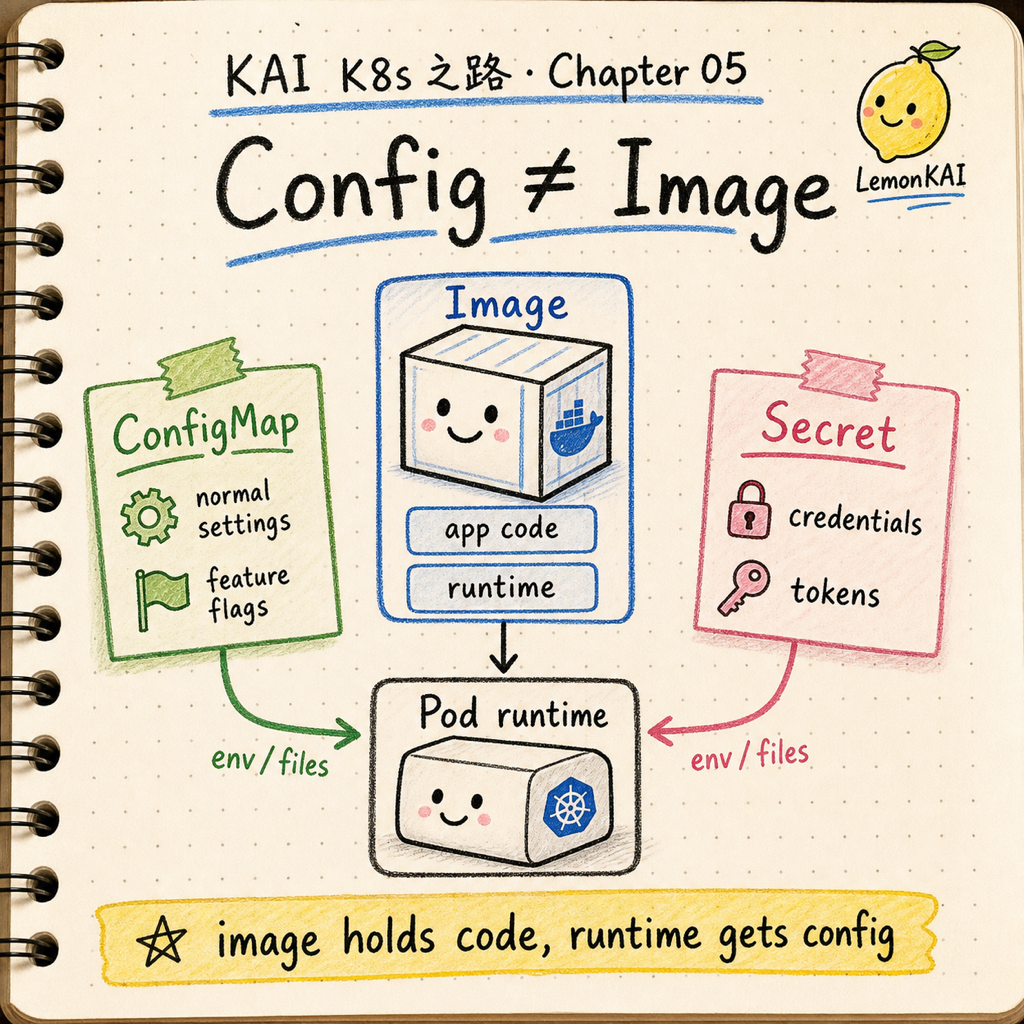
Do not treat the image like a suitcase for everything
A container image is good at carrying:
- application code
- runtime
- dependencies
- default files that do not identify an environment
It is not a good place for:
- production API URLs
- live feature flag decisions
- database passwords
- tokens
- settings that differ per cluster
If those values are baked into the image, the same program can no longer move cleanly across environments.
A configuration change should feel like changing a runtime sheet.
It should not require rebuilding the suitcase.
Think of ConfigMaps and Secrets like checking into a hotel
I remember this chapter with a hotel check-in example.
Your suitcase is like the container image: it carries your clothes, charger, and normal tools.
But the room number, Wi-Fi details, and room key should not be sewn into the suitcase.
When you check in, the front desk gives you the runtime details for this stay:
- ordinary information: breakfast time, Wi-Fi name, floor notes
- sensitive access: room key and door permission
A ConfigMap is like the ordinary check-in information.
A Secret is like the room key.
Neither is the suitcase itself. Both are runtime data handed to you when you arrive in that environment.
The responsibility split
I do not like remembering ConfigMap as merely “some key-value pairs.”
I remember it as:
ConfigMap is the normal configuration layer for a workload.
Examples:
APP_MODE=productionLOG_LEVEL=info- feature flags
- non-sensitive endpoints
- small configuration files
A Secret is:
Secret is the sensitive data layer for a workload, but it is not a full vault.
Examples:
- database passwords
- API tokens
- TLS keys
- private registry credentials
They feel similar when consumed by a Pod: both can become environment variables, and both can be mounted as files.
The meaning is different.
ConfigMap tells the app how this environment behaves.
Secret gives the app a specific key it is allowed to use.
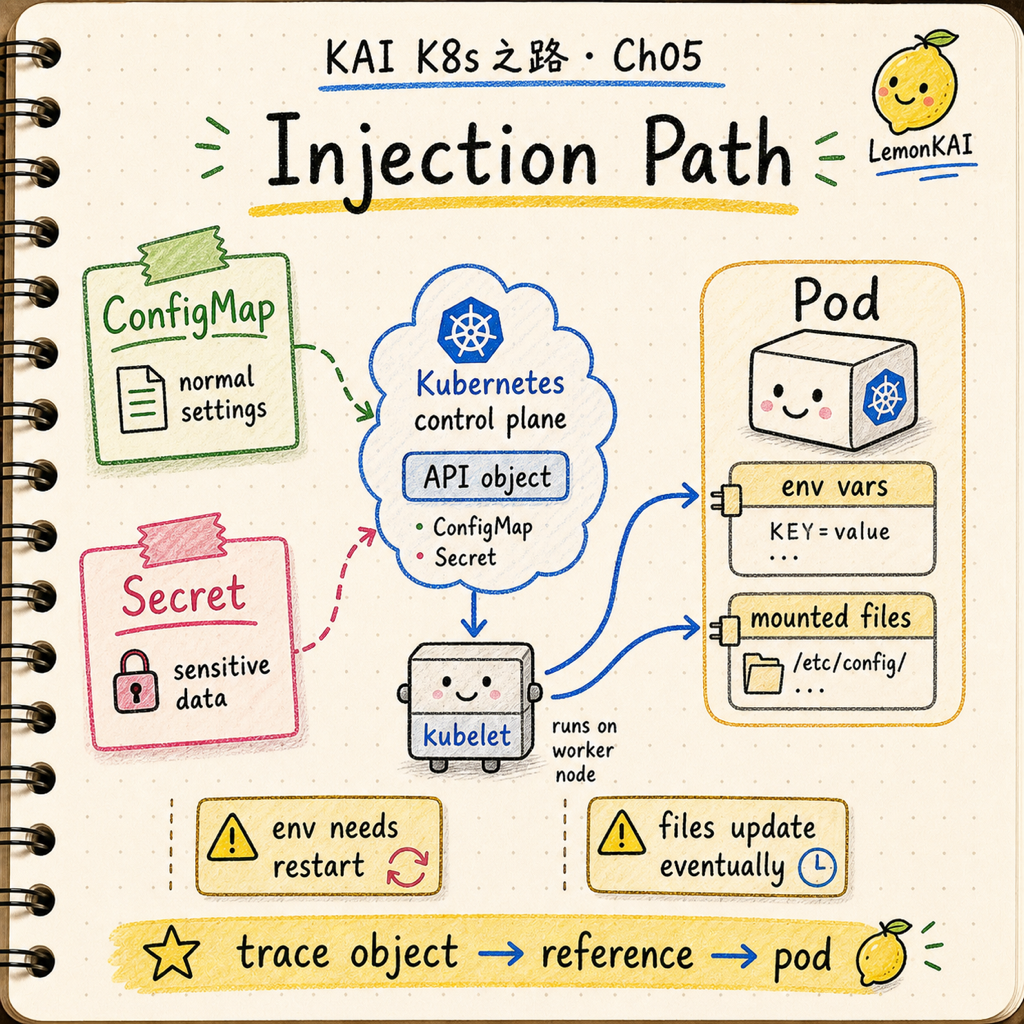
What Kubernetes actually does
Here is the useful version:
- You create a
ConfigMaporSecretKubernetes API object. - The Pod spec references those objects, using mechanisms such as
envFrom,valueFrom, or a volume mount. - The
kubeletmakes the data available to the container when it starts. - The application reads environment variables or files. Kubernetes does not understand the application-level meaning of those values.
- If the ConfigMap or Secret changes later, existing environment variables do not live-update. Volume projections can eventually update, but the application still needs to reload or reread the file.
The fifth point is where many people get surprised.
“I changed the ConfigMap” does not automatically mean “my running process now sees new configuration.”
If the value was injected as an environment variable, the Pod usually needs to restart.
If the value was mounted as a file, the projected file may update eventually, but the app may still have read it only once at startup.
A simplified configuration example
Start with normal configuration:
apiVersion: v1
kind: ConfigMap
metadata:
  name: web-config
data:
  APP_MODE: production
  LOG_LEVEL: info
  FEATURE_CHECKOUT: "true"
Then sensitive data.
This value is intentionally fake; real Secrets should not be committed to a public repository.
apiVersion: v1
kind: Secret
metadata:
  name: web-credentials
type: Opaque
stringData:
  DATABASE_PASSWORD: "example-only-do-not-commit-real-secret"
A Deployment can reference them like this:
apiVersion: apps/v1
kind: Deployment
metadata:
  name: web
spec:
  template:
    spec:
      containers:
        - name: web
          image: ghcr.io/example/web:1.0.0
          envFrom:
            - configMapRef:
                name: web-config
          env:
            - name: DATABASE_PASSWORD
              valueFrom:
                secretKeyRef:
                  name: web-credentials
                  key: DATABASE_PASSWORD
The YAML syntax is not the main point.
The responsibility split is:
- the image remains reusable
- ConfigMap carries normal environment settings
- Secret carries sensitive data references
- Deployment declares which runtime data this workload needs
Secret is not a vault
This part matters.
Secret is better than putting credentials directly in a Pod spec or baking them into an image, but it does not mean “secure by default in every direction.”
Kubernetes documentation calls out several important boundaries:
- Secrets can be stored unencrypted in the API server backing store unless encryption at rest is configured.
- Anyone with sufficient API access can retrieve or modify a Secret.
- Anyone who can create Pods in a namespace may be able to indirectly use Secrets in that namespace.
- When Secrets are mounted into Pods, the kubelet stores a local copy in memory-backed storage and removes it after the dependent Pod is deleted.
So Secret safety is not only about kind: Secret.
It also depends on:
- encryption at rest for etcd
- least-privilege RBAC
- not printing secret values into logs
- not committing real Secret YAML into source control
- using an external secret manager when the system needs one
The short version:
Secret is Kubernetes’ type and delivery path for sensitive data. It is not the entire secret-management strategy.
Common beginner mistakes
1. Treating Secret base64 as encryption
Secret manifests often contain base64-looking values in the data field.
Base64 is encoding, not encryption.
Do not treat unreadable text as protected text.
2. Expecting env injection to refresh automatically
Environment variables are fixed once the container starts.
Changing a ConfigMap or Secret does not rewrite the environment of an already running process.
3. Putting sensitive values in ConfigMap
If a value grants access to a system, an external service, or user data, treat it as sensitive first.
“It is only staging” is not a good reason to put it in a ConfigMap.
4. Granting RBAC that is too broad
list or watch on Secrets is powerful.
Sometimes a workload only needs one key, but the permission model accidentally gives it a whole namespace of keys.
5. Forgetting that the app has to reload
Even if a mounted file updates, the application may not reread it.
Kubernetes can project data into the filesystem. It cannot guarantee your program understands that new data.
How I would inspect this
If someone says “I changed configuration but the service did not change,” I ask three questions first:
- Was the value injected as an env var or as a mounted file?
- Did the Pod actually restart or roll out after the change?
- Does the app read configuration once at startup, or can it watch and reload?
I would check:
kubectl get configmap -n <ns>
kubectl get secret -n <ns>
kubectl describe deploy <deploy-name> -n <ns>
kubectl describe pod <pod-name> -n <ns>
kubectl rollout status deploy/<deploy-name> -n <ns>
For Secrets, I avoid dumping values into a terminal, CI log, or chat.
I only confirm:
- the Secret object exists
- Deployment or Pod references the correct name and key
- mount paths or env names match what the app expects
- the most recent rollout happened after the configuration change
- Events do not show missing keys, permission errors, or mount failures
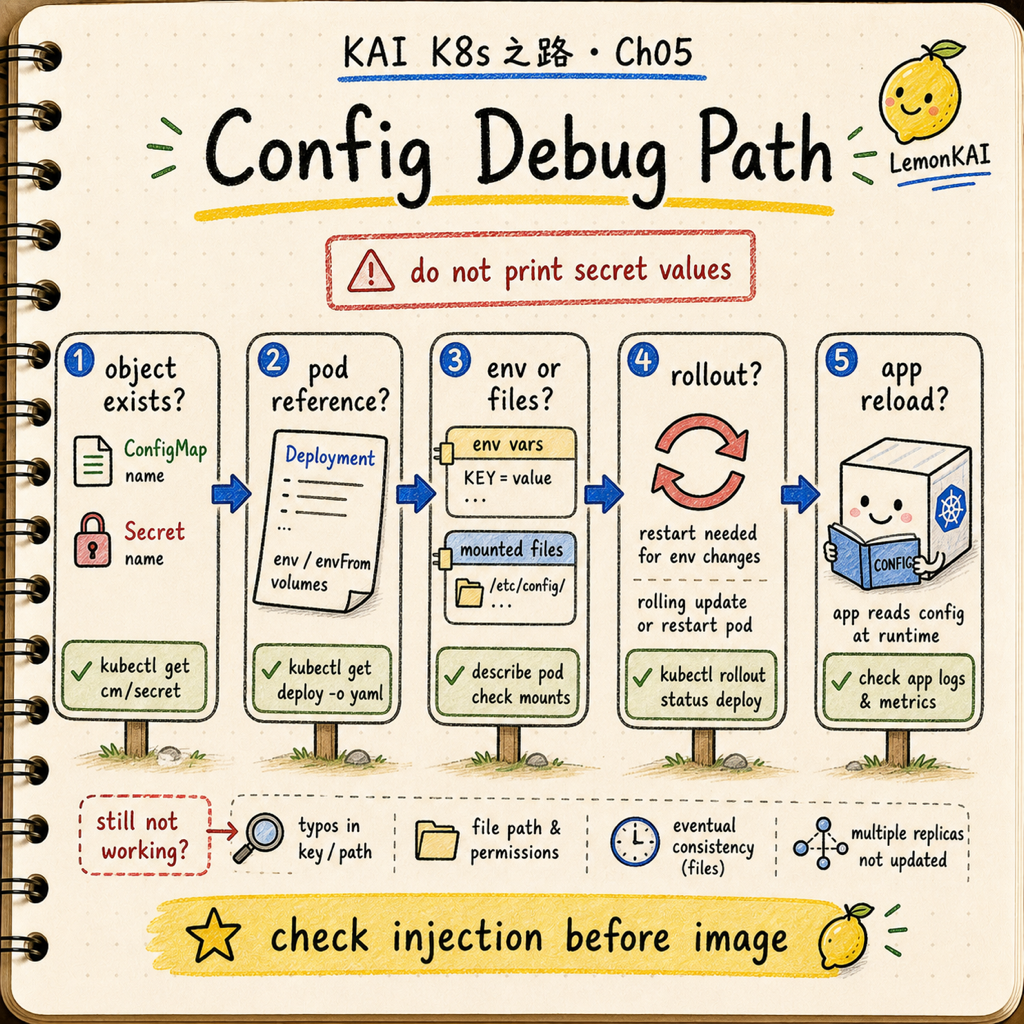
The short version:
When configuration does not take effect, inspect the injection path before blaming the image.
My mental model for ConfigMaps and Secrets
I do not remember this chapter as “Kubernetes has two resources for settings.”
That is just vocabulary.
I remember it like this:
ConfigMaps and Secrets are the slots between the image and the environment.
The image says what the program is.
ConfigMap and Secret say how this deployment should run and which keys it is allowed to use.
Once the slot is explicit, one image can move across multiple environments.
If the slot is baked back into the image, Kubernetes becomes an overcomplicated packaging tool.
Three takeaways
- Put the program in the image, not environment decisions or secrets.
- Use ConfigMaps for normal settings and Secrets for sensitive data, but still enforce RBAC and encryption boundaries.
- Env injection usually needs a restart to change. Volume projection can eventually update, but the app must reload or reread.
Next in the series: Volumes and PersistentVolumes: Pods can be replaced, but data should not disappear with them.
Technical references: