Mainline
KAI Road of Kubernetes 06 — Volumes and PersistentVolumes: Pods can move, data should not disappear
ConfigMaps and Secrets moved runtime configuration out of the image, but workloads also write data. This chapter connects Volumes, PersistentVolumes, PersistentVolumeClaims, and StorageClasses so storage has a clearer lifecycle than the Pod that happens to use it.
A Volume is a mountable data location inside a Pod; PVs and PVCs move long-lived data out of the Pod lifecycle.
Separate temporary Pod storage from persistent storage. `emptyDir` follows the Pod; PVC-backed storage binds a workload request to a PV. Debug storage from PVC status outward: PVC, PV, StorageClass, Events, and mount errors.
The previous chapter separated configuration from the image.
An image should package the program, not the environment decision or the secret.
But workloads do more than read configuration.
They also write things:
- uploaded files
- cache
- log buffers
- queue checkpoints
- database data
That creates the next problem.
Pods can be recreated. Containers can restart. Nodes can change.
If data only lives in the writable filesystem of one container, it is tied too tightly to the fate of that container.
The sentence I would keep is this:
A Volume is a mountable data location inside a Pod; PVs and PVCs move long-lived data out of the Pod lifecycle.
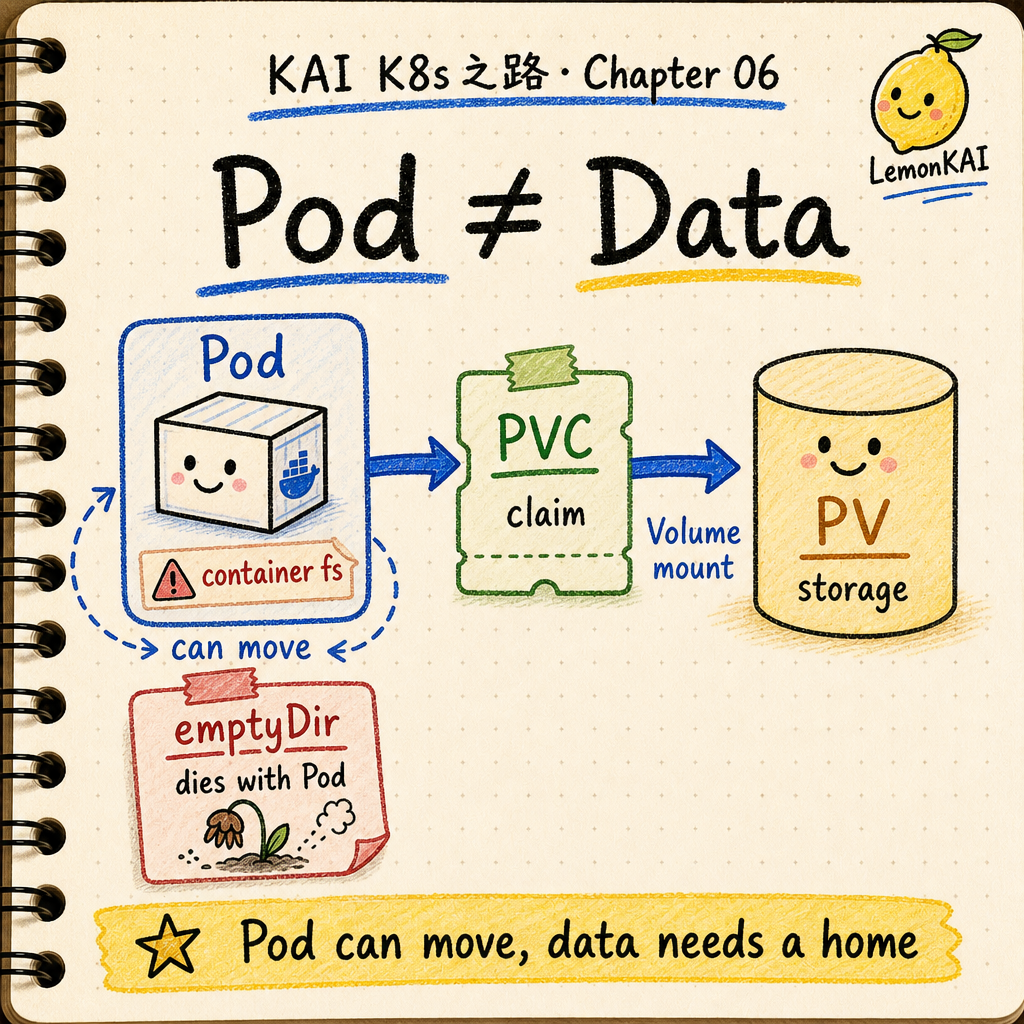
Do not treat the container filesystem as a hard drive
A container image gives the process a clean starting point.
After the process starts, it can write files.
That does not mean the container has become a reliable disk.
When a container restarts, the writable layer of that container is not the place I want to trust for durable application data.
When a Pod is deleted, moved, or recreated, I should not expect data written inside the old container filesystem to naturally come back.
That is why Kubernetes has Volumes.
The first question is simple:
Where should containers in this Pod write data through an explicit mount point?
PersistentVolume and PersistentVolumeClaim answer the next question:
If the Pod disappears, should this data still exist, who provides it, and who is allowed to claim it?
Think of Volumes, PVs, and PVCs like rented storage
I remember this chapter with a mini-storage example.
A Pod is like a temporary workshop.
You walk in, do work, use the desk, and maybe tomorrow the whole room is gone and you get a different one.
If you only need temporary scratch paper, the desk is fine.
That is close to emptyDir: it exists while the Pod exists, and it can survive container restarts, but when the Pod is removed from the node, the data is gone.
If the material is important, you do not leave it only in the temporary room.
You rent a storage unit.
The storage unit is like a PersistentVolume: real storage capacity in the cluster.
The rental form is like a PersistentVolumeClaim: the workload does not need to know the exact disk brand, cloud provider, or storage backend. It requests capacity, access mode, and storage class.
The menu of storage plans is like a StorageClass: standard storage, faster storage, zone-aware storage, each backed by a different provisioner or policy.
The only memory model I need is:
The Pod is the workshop. The PVC is the rental form. The PV is the actual storage unit.
A Volume is first a mount point
A Kubernetes Volume is not always a permanent disk.
The first meaning is more basic:
A Volume is a data source declared in the Pod spec, and each container mounts it at a path.
So the Pod spec has two important places:
.spec.volumes: which volumes exist for this Pod.spec.containers[*].volumeMounts: which container mounts which volume at which path
The same volume can be used by multiple containers in the same Pod.
But each container declares whether it mounts that volume and where it appears.
This matters.
A Volume is not background magic.
It is a specific path mounted into the container filesystem.
emptyDir is temporary storage inside a Pod
emptyDir is the easiest way to build the first storage intuition.
It is created when the Pod is assigned to a node, and it starts empty.
Containers in the Pod can read and write it.
A container crash does not delete the emptyDir, because the Pod still exists.
But when the Pod is removed from that node, the data in the emptyDir is permanently deleted.
So it is useful for:
- scratch files
- cache
- shared working data between containers
- recomputable intermediate results
It is not the right place for:
- the only copy of user uploads
- database data
- non-rebuildable queue state
- anything the application still needs tomorrow
The short version:
emptyDir can survive a container restart. It cannot survive the Pod going away.
PV and PVC are about data lifecycle
If data must live longer than the Pod, the design moves into PersistentVolume territory.
I do not remember PV and PVC as two similar abbreviations.
I remember the responsibility split:
PersistentVolume: a storage resource in the cluster, either created by an administrator or dynamically provisioned through a StorageClassPersistentVolumeClaim: a namespaced request for storage, including capacity, access mode, and storage classStorageClass: the storage plan and provisioner used when dynamically creating PVs
A Pod usually does not say, “give me that exact cloud disk.”
It says, “use this PVC.”
Kubernetes uses the PVC to find the bound PV, then mounts that storage into the Pod.
That abstraction feels very Kubernetes:
the workload describes what it needs.
the cluster binds that need to real infrastructure.
A simplified PVC example
Start with the claim:
apiVersion: v1
kind: PersistentVolumeClaim
metadata:
  name: web-data
spec:
  accessModes:
    - ReadWriteOnce
  storageClassName: standard
  resources:
    requests:
      storage: 10Gi
This does not mean “create a folder.”
It means:
I need 10Gi of storage from the standard StorageClass, mounted with ReadWriteOnce semantics.
A Pod template can reference that claim:
apiVersion: apps/v1
kind: Deployment
metadata:
  name: web
spec:
  replicas: 1
  selector:
    matchLabels:
      app: web
  template:
    metadata:
      labels:
        app: web
    spec:
      containers:
        - name: web
          image: ghcr.io/example/web:1.0.0
          volumeMounts:
            - name: web-data
              mountPath: /var/lib/web
      volumes:
        - name: web-data
          persistentVolumeClaim:
            claimName: web-data
The point is the responsibility split:
- the PVC describes the storage request
- the Deployment describes where the workload mounts it
- the application writes to
/var/lib/web - the storage backend details stay behind the cluster abstraction
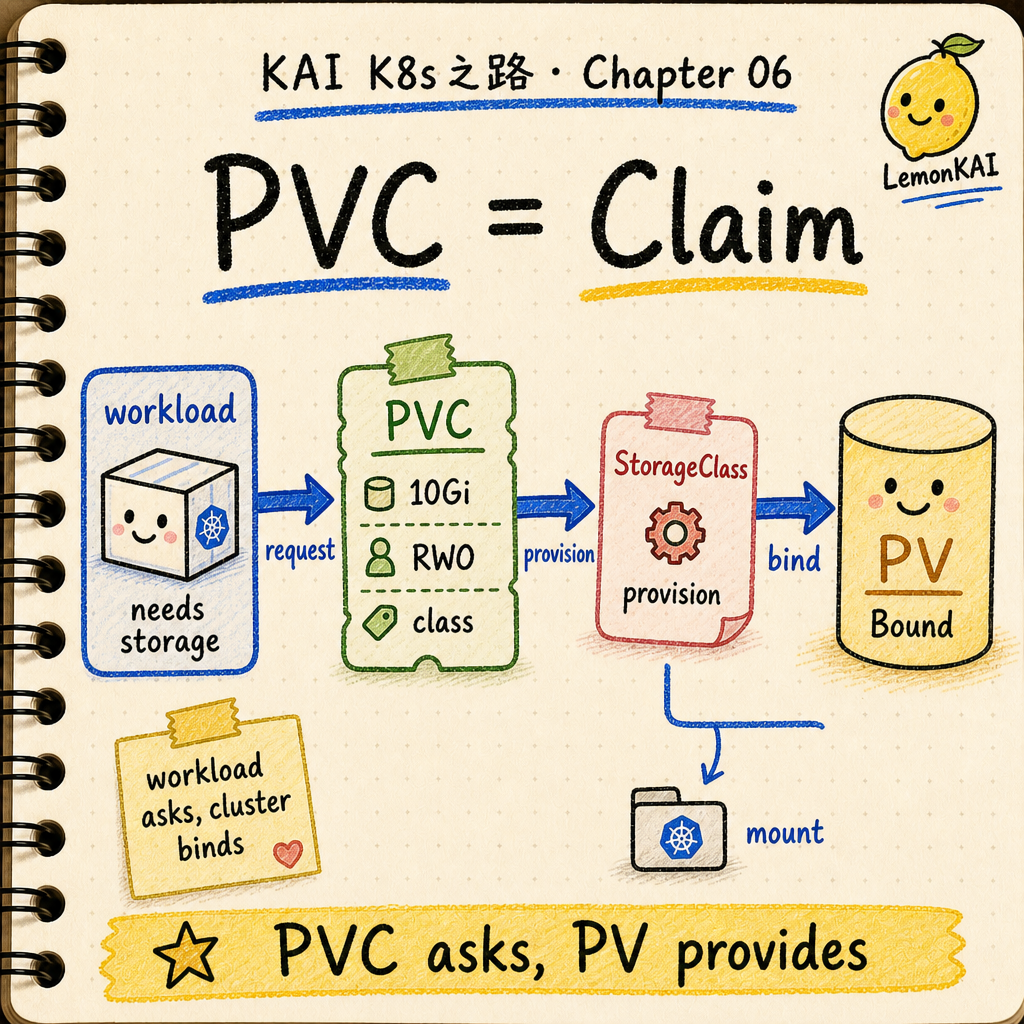
What Kubernetes actually does
Here is the useful version:
- You create a PVC with capacity, access mode, and StorageClass.
- The control plane finds a matching PV, or dynamically provisions one through the StorageClass.
- Once the claim and volume bind, the PVC becomes
Bound. - A Pod references the PVC as a volume.
- After the Pod is scheduled to a node, the kubelet and storage driver attach and mount the volume at the requested path.
- When the Pod goes away, what happens to the underlying data depends on reclaim policy, the storage backend, and whether you have backups.
There are a few boundaries worth keeping precise.
First, PVC Bound does not guarantee that the application can write.
The system can still fail later on topology, attach, mount permissions, filesystem, driver behavior, or quota.
Second, ReadWriteOnce is not a universal “only one Pod” lock.
It means the volume can be mounted read-write by a single node. If the design needs a cluster-wide single-Pod writer guarantee, look at ReadWriteOncePod and CSI driver support.
Third, reclaim policy is not a backup strategy.
Many dynamically provisioned PVs inherit the reclaim policy from their StorageClass; a common default is Delete.
Before deleting a PVC, know whether the backing data will be retained or deleted.
Common beginner mistakes
1. Thinking every Volume is permanent
Volume is an abstraction, not a durability promise.
emptyDir, configMap, secret, and PVC-backed volumes all have different lifecycles.
Ask for the volume type before assuming the data survives.
2. Treating the PVC as the data itself
A PVC is a claim, not the stored content.
It is the workload’s request and reference point for storage.
The actual data lives behind the PV and storage backend.
3. Sharing one RWO PVC across multiple Deployment replicas
This often turns into a scheduling or mount problem.
Even when multiple Pods on the same node can touch the same RWO volume, that does not make the application data model safe.
If every replica needs stable identity and its own storage, the next chapter is StatefulSet.
4. Looking only at the Pod
A Pod stuck in ContainerCreating is not always an image problem.
The PVC may still be Pending, or attach / mount may be failing.
5. Deleting PVCs without checking reclaim policy
Some data is really gone after deletion.
Kubernetes can manage storage object lifecycles, but it does not replace your backup strategy.
How I would inspect it
If someone says “the Pod will not start” and the workload uses storage, I would not only read logs.
I would walk these layers:
kubectl get pvc -n <ns>
kubectl describe pvc <pvc-name> -n <ns>
kubectl get pv
kubectl describe pv <pv-name>
kubectl get storageclass
kubectl describe pod <pod-name> -n <ns>
kubectl get events -n <ns> --sort-by=.lastTimestamp
The signals I care about:
- whether the PVC is
PendingorBound - whether capacity, access mode, and StorageClass match the workload
- whether the PV reclaim policy is
DeleteorRetain - whether Pod Events mention attach, mount, or permission errors
- whether the storage backend has topology constraints
- whether multiple replicas are sharing a PVC that should not be shared
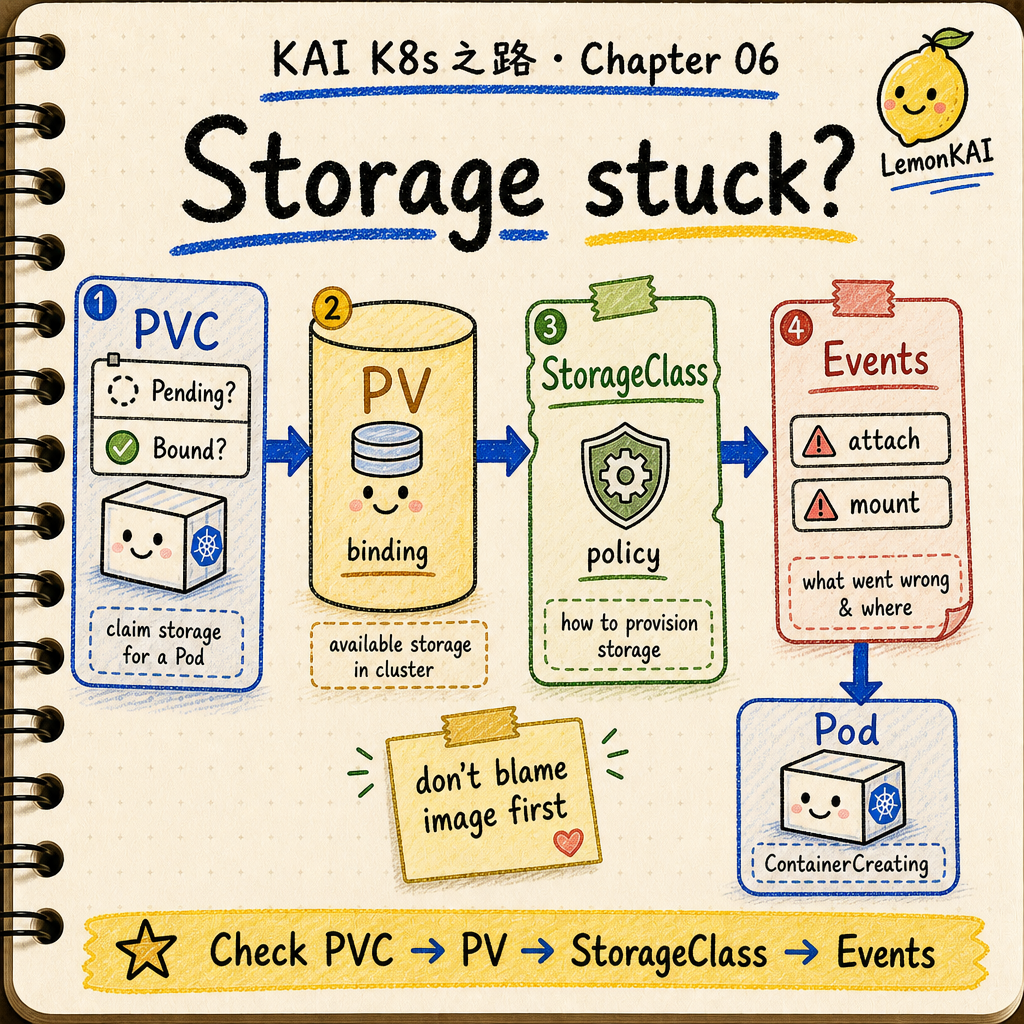
Short version:
When storage breaks, do not inspect only the Pod. Walk PVC -> PV -> StorageClass -> Events.
How I remember Volumes
I do not remember this chapter as “Kubernetes has many volume types.”
That turns into a list too quickly.
I remember it like this:
Volume is the join between a workload and data; PV/PVC moves that join out of the Pod’s lifetime.
Pods can be recreated.
Containers can restart.
Nodes can be replaced.
But if data has business meaning, it cannot merely be “whatever happened to be written inside one container.”
It needs its own lifecycle, request model, mount point, reclaim boundary, and backup boundary.
This will keep coming back.
Once you run stateful workloads, the hard part of Kubernetes is not starting a process.
The hard part is that the process can change, but identity and data cannot be random.
Three things to keep
- A Volume is an explicit data mount inside a Pod; it is not automatically persistent storage.
emptyDirfollows the Pod; PV/PVC move data lifecycle outside the Pod.- Debug storage from PVC status first, then PV, StorageClass, Events, and mount errors.
The next chapter should ask: What is a StatefulSet? When every Pod needs a stable name and its own data, Deployment stops being the most comfortable tool.
Technical references: