Mainline
KAI Road of Kubernetes 04 — What Probes are, and why Running is not Ready
A Service gives a stable entry point, but Kubernetes still needs to know which Pods can safely receive traffic. This chapter separates readiness, liveness, and startup probes so a workload does not turn a slow warm-up into a restart loop.
Running only means the process is up. Ready means the Pod can safely receive traffic. Probes are the workload status signals Kubernetes acts on.
Keep probe responsibilities separate: readiness controls traffic, liveness controls restarts, and startup protects slow boot. Then inspect Events and EndpointSlices.
The previous chapter made Service clear:
Pods change, so the entry point should not drift.
But a stable entry point does not mean every Pod behind it can actually serve traffic.
This is one of the first traps in Kubernetes:
The Service looks normal. DNS works. But requests still timeout, return 502, or fail randomly.
The sentence I would keep is this:
Running only means the process is up. Ready means it can safely receive traffic. Probes are the status signals Kubernetes acts on.
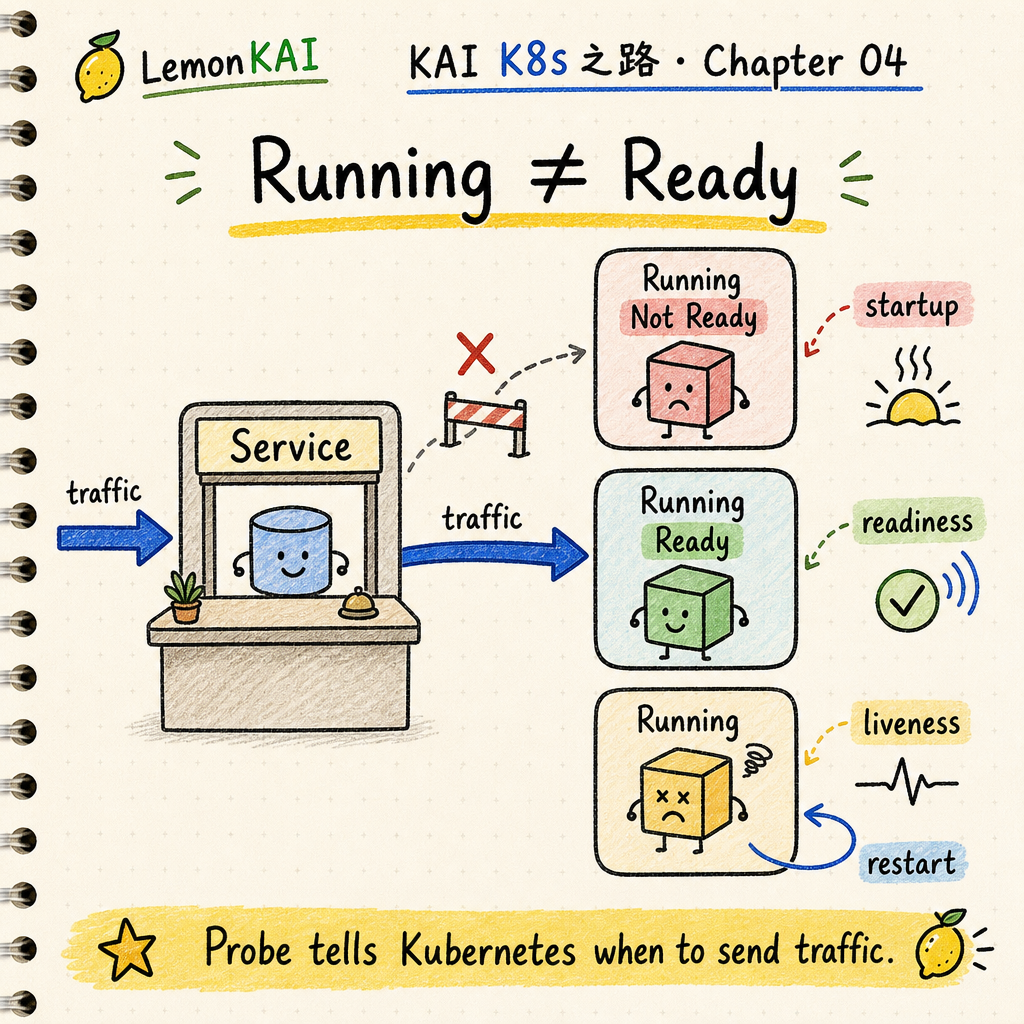
Do not treat Running as Ready
When a Pod reaches Running, it means the container process has started.
Your application may still be doing work:
- connecting to a database
- loading configuration
- warming caches
- waiting for a dependency to become usable
So Running does not mean “stable enough to receive user traffic.”
If the Service starts routing traffic too early, users do not experience “fast startup.” They experience unstable responses.
Think of probes like opening a restaurant
I remember this chapter with a restaurant example.
The lights are on, but that does not mean the restaurant is ready for customers.
The kitchen may still be preparing ingredients. The POS terminal may not be connected. The staff may still be doing the morning setup.
If the door says “open” too early, customers walk in and cannot actually order anything.
Probes answer three different questions for Kubernetes:
startupProbe: am I still starting normally, so do not judge me too early?readinessProbe: can I receive orders now, or should traffic stay away?livenessProbe: am I stuck badly enough that I should be restarted?
The three probe roles should not be mixed
I compress the split like this:
readiness controls traffic, liveness controls restarts, and startup protects slow boot.
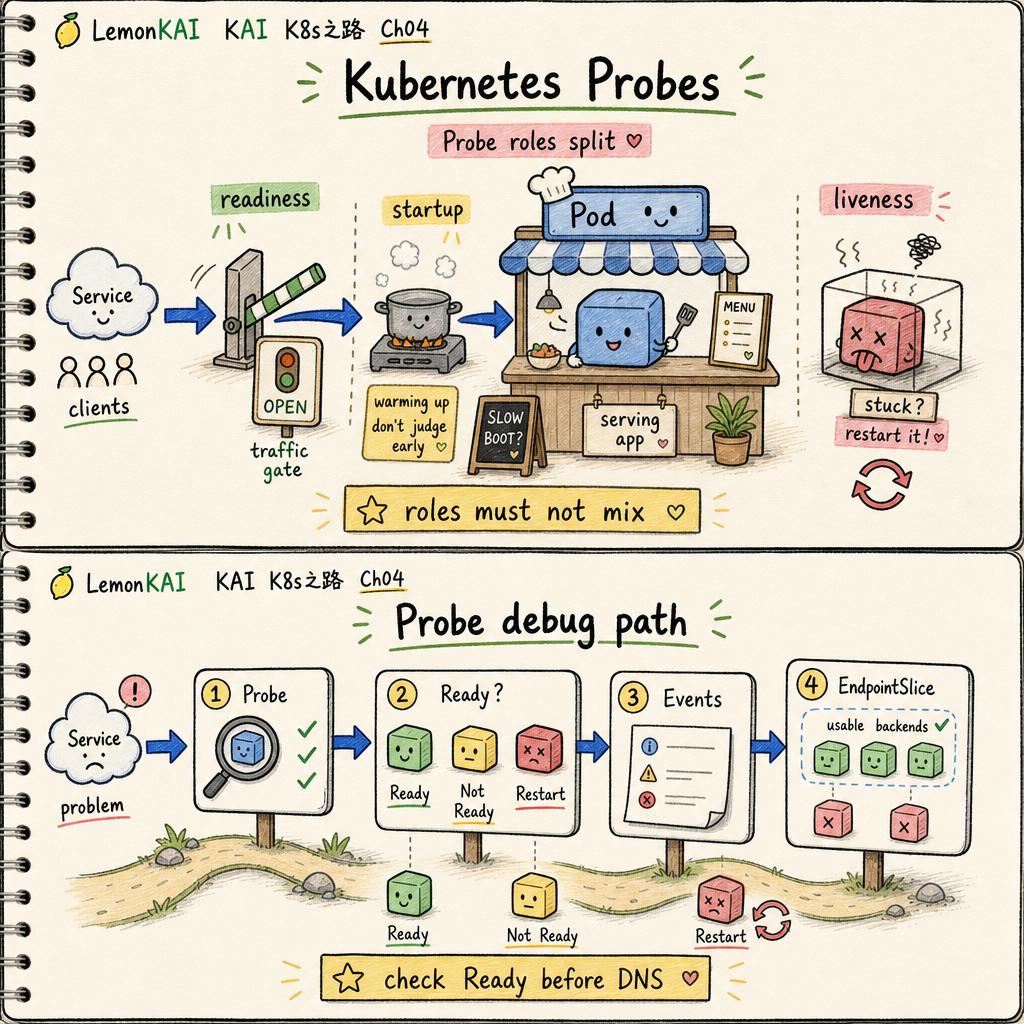
Those probes can check the same endpoint, or they can check separate endpoints.
The important part is not whether the endpoint string is identical.
The important part is that the meaning does not fight itself.
If readiness and liveness are treated as the same signal, the system can turn “temporarily not ready” into “restart this container.” That is how a small delay becomes an incident.
What Kubernetes actually does
Here is the technically precise version without making it too heavy:
- The
kubeletruns probes periodically, using mechanisms such as HTTP, TCP, exec, or gRPC. - When
readinessProbefails, the Pod becomes not ready. EndpointSlices for matching Services remove that Pod from the ready backend set. - When
livenessProbefails at leastfailureThresholdtimes, the kubelet treats the container as unhealthy and restarts that container. - If
startupProbeis configured, liveness and readiness probes do not run until the startup probe succeeds.
These are defined Kubernetes behaviors, not just community convention.
Reference: https://kubernetes.io/docs/concepts/workloads/pods/probes/
A simplified configuration example
apiVersion: v1
kind: Pod
metadata:
  name: web
spec:
  containers:
    - name: web
      image: ghcr.io/example/web:1.0.0
      ports:
        - containerPort: 8080
      startupProbe:
        httpGet:
          path: /healthz
          port: 8080
        periodSeconds: 10
        failureThreshold: 30
      readinessProbe:
        httpGet:
          path: /ready
          port: 8080
        periodSeconds: 5
        timeoutSeconds: 2
        failureThreshold: 3
      livenessProbe:
        httpGet:
          path: /healthz
          port: 8080
        periodSeconds: 10
        timeoutSeconds: 2
        failureThreshold: 3
The exact numbers are not the main point.
The responsibility split is the point:
startupProbegives slow startup a protected windowreadinessProbecontrols whether the Pod joins the Service traffic poollivenessProbehandles truly stuck states
Common beginner mistakes
1. Treating Running as traffic-ready
This is the most common wrong read.
A Service having endpoints does not guarantee that those endpoints are stable enough to serve traffic.
2. Using liveness to solve a readiness problem
If a dependency has a short failure and liveness kills the container, the workload may become even less stable.
Not ready should often mean “stop sending traffic for now,” not “restart immediately.”
3. Making readiness too heavy
If the probe endpoint itself is expensive, the health check can become part of the load problem.
The probe should tell Kubernetes whether the app can serve. It should not become a mini production request.
4. Giving slow-starting services no startupProbe
Without a startup probe, a slow boot path can be killed by liveness before it has a fair chance to become healthy.
How I would inspect this
If someone says “the Service is not working,” I check probes before blaming the network.
kubectl get pod -n <ns>
kubectl describe pod <pod-name> -n <ns>
kubectl logs <pod-name> -n <ns> --previous
kubectl get endpointslice -n <ns> -l kubernetes.io/service-name=<svc-name>
I look for:
- whether the
READYcolumn stays at0/1 - whether
RESTARTSkeeps increasing - whether Events show readiness failures or liveness failures
- whether EndpointSlice still has ready backends
- whether probe path, port, timeout, or threshold is too aggressive
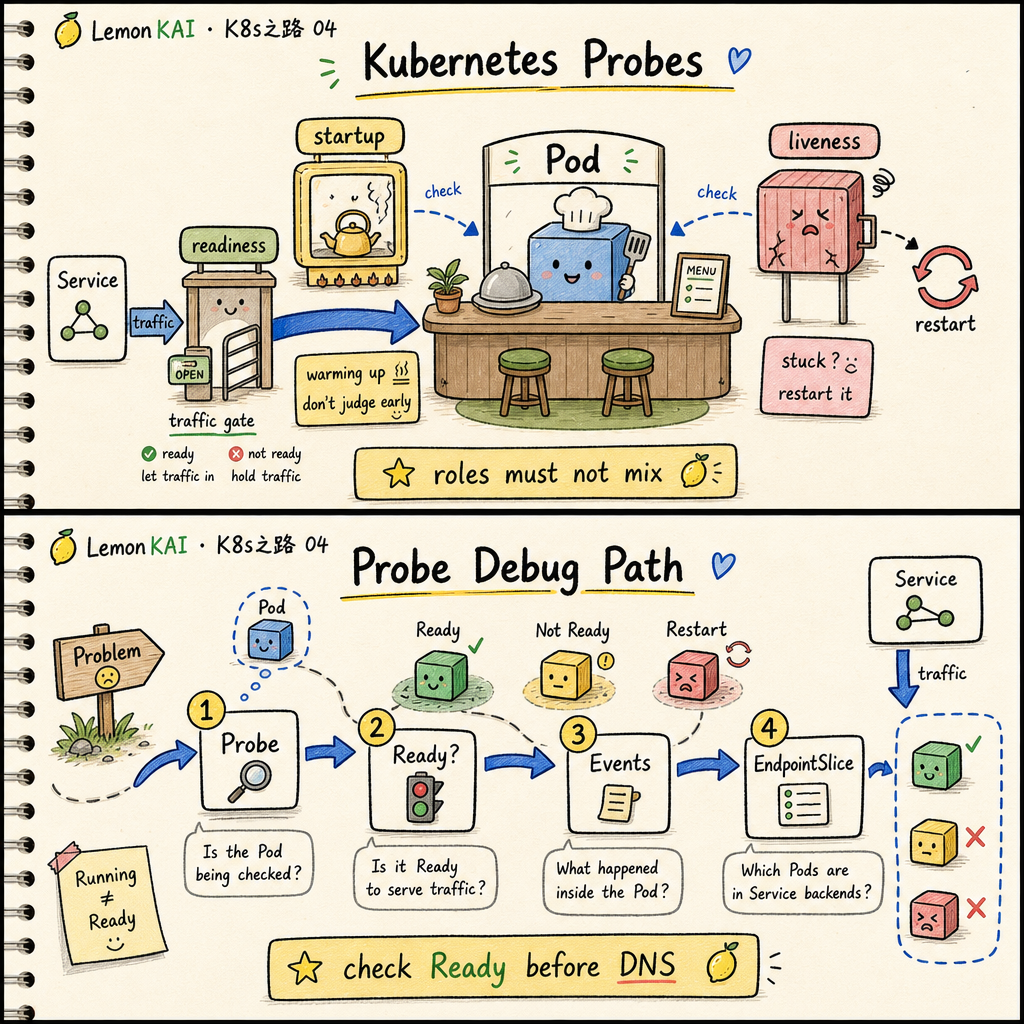
The short version:
When a Service does not work, ask whether the Pod is Ready before asking whether the network is broken.
My mental model for probes
I do not like memorizing probes as just “health checks.”
That is too empty.
I treat probes as a contract:
A workload uses probes to tell Kubernetes when it can receive traffic, when it is only slow, and when it is truly stuck enough to restart.
When that contract is right, the platform helps the workload converge.
When that contract is wrong, the platform can reliably manufacture failure.
Three takeaways
Runningis notReady; Ready is what makes a Pod traffic-safe.readinesscontrols traffic,livenesscontrols restarts, andstartupprotects slow boot.- Debug Service issues through
Probe -> Ready state -> EndpointSlice; this is often more useful than blaming DNS first.
Next in the series: ConfigMap / Secret: why configuration and keys should not be baked into the container image.